
The Tangem Wallet Deposit Missing condition occurs when an inbound cryptocurrency transfer fails to display in the Tangem mobile application balance due to blockchain network congestion, unenabled token contract visibility, cross-chain network selection mismatches, unconfirmed exchange processing, or local app RPC node synchronization delays.
Technical Diagnostic Matrix for Missing Deposits
| Cause Category | Primary Indicator | Timeframe to Resolution | Primary Recovery Action |
| Unenabled Token Visibility | Explorer shows “Success”, App balance unchanged | Instant (< 1 min) | Add token contract manually via Manage Tokens |
| Network Mismatch | Sent via L2 (e.g., Arbitrum) to mainnet address | Instant (< 2 mins) | Enable corresponding network sub-token in app |
| Blockchain Mempool Delay | Transaction Hash (TxID) pending on-chain | 10–120 minutes | Wait for standard block confirmations |
| Exchange Outbound Hold | Status marked “Processing” or “Pending” on Exchange | 1–24 hours | Complete exchange KYC/2FA verification checks |
| App Node Desynchronization | On-chain balance verified, app display zero | Instant (< 1 min) | Force-refresh app or change default RPC server |
How to Recover Unconfirmed Transactions in Tangem Wallet
1.Obtain the Transaction Hash (TxID):Locate the unique transaction identifier from your sending platform.
Log into the sending wallet or exchange platform. Navigate to your withdrawal history, select the specific transaction, and copy the Transaction Hash (TxID) or direct blockchain explorer link provided by the platform.
2.Verify Transaction Status on a Public Blockchain Explorer:Determine if the transaction has settled on the underlying ledger.
Open an appropriate block explorer (e.g., Etherscan for Ethereum/EVM, Blockchain.com for Bitcoin, Solscan for Solana). Paste the copied TxID or your Tangem public deposit address into the search bar to confirm if the status reads Success, Pending, or Failed.
3.Enable the Target Token Network in Tangem App:Resolve local app display limits without moving funds.
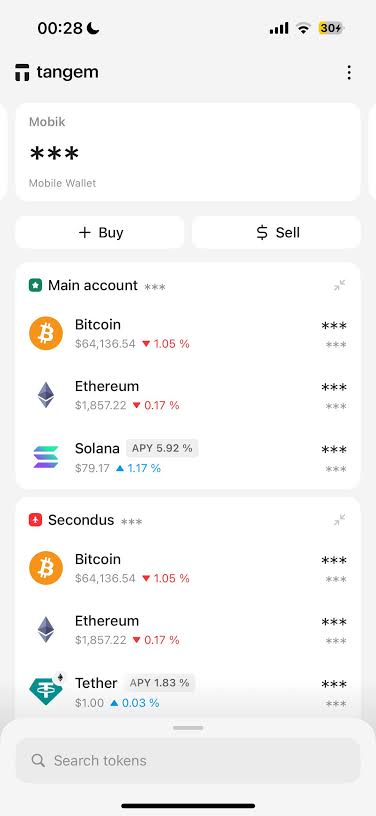
If the block explorer confirms Success but the asset is absent in Tangem, open the Tangem app. Tap the top-right settings icon, select Manage Tokens, search for the specific token symbol, and toggle ON the exact blockchain network used during transmission.
4.Force Network Refresh and Verify RPC Connection:Clear local caching issues within the mobile app.
Swipe down on the Tangem main wallet screen to force a balance re-sync with blockchain RPC nodes. If the balance remains hidden, navigate to app settings, toggle off active VPNs, or switch internet connections to resolve node timeout errors.
Blockchain Confirmation Standards and Delay Factors
Network transfer speeds vary significantly based on individual blockchain consensus rules, gas fees attached by the sender, and current block validation traffic.
| Blockchain Network | Minimum Confirmations Required | Average Confirmation Time | Primary Cause of Transfer Delays |
| Bitcoin (BTC) | 1 to 3 Confirmations | 10 to 60 Minutes | Low miner fee (Mempool backlog) |
| Ethereum (ETH) | 12 to 64 Blocks | 2 to 15 Minutes | Surge in Gwei network execution gas fees |
| Polygon (MATIC) | 128 Blocks | 1 to 5 Minutes | Reorg protection / RPC node propagation lag |
| Solana (SOL) | 31 Slot Confirmations | 10 to 30 Seconds | Network congestion / Dropped transaction slots |
| Binance Smart Chain (BSC) | 15 Blocks | 1 to 3 Minutes | Incorrect BEP2 vs. BEP20 network choice |
Security Note: Tangem is a non-custodial cold storage device. Your digital assets reside on the blockchain, not inside the physical card or app. If an on-chain explorer verifies funds at your public address, your funds are safe regardless of app interface displays.
If your Tangem deposit is not appearing as expected, follow this guide on crypto wallet deposit not showing up for step-by-step diagnostic checks.
Troubleshooting Operational Errors and Network Mismatches
1. Cross-Chain / Wrong Network Transfers
Sending an EVM token over an alternate layer-2 network (e.g., sending USDT via Polygon to an Ethereum deposit screen) will result in a missing deposit display. Because EVM addresses share identical public keys across chains, funds are recoverable.
- Recovery Protocol: Open Tangem, go to Manage Tokens, search for the transferred asset, and enable the specific blockchain network used by the sender. Tap Save Changes and scan your physical Tangem card via NFC.
2. Missing Destination Tag or Memo
Centralized exchanges require a Memo/Destination Tag for shared address networks like Ripple (XRP), Stellar (XLM), or Cosmos (ATOM). If you transferred funds from Tangem back to an exchange without entering the designated Memo, the exchange system cannot auto-credit your account.
- Recovery Protocol: Contact the receiving exchange support team immediately. Provide the TxID, your sender public address, and proof of account ownership to initiate manual wallet reconciliation.
3. Outdated Mobile Application Version
Legacy builds of the Tangem application may lack support for newer smart contract standards, custom tokens, or updated layer-2 RPC endpoints, resulting in display errors.
- Recovery Protocol: Visit the official Google Play Store or Apple App Store, update the Tangem app to the latest release, and perform a hard restart of your mobile device.
If the missing deposit originated from Coinbase, review this guide on transfer crypto from Coinbase to Tangem Wallet to verify the transfer process.
Frequently Asked Questions
Deposits usually fail to show because the specific blockchain network is not toggled on under Tangem’s “Manage Tokens” menu. Other common reasons include unconfirmed transactions pending in the blockchain mempool, exchange withdrawal processing holds, or temporary local RPC node sync delays.
Copy your public wallet address from Tangem or the TxID from your sending exchange, then paste it into a public blockchain explorer like Etherscan, BscScan, or Solscan. The explorer displays real-time confirmation counts and block execution status independently of the mobile app display.
Funds are rarely lost permanently on EVM-compatible networks because Tangem uses the same public key across multiple chains. You can recover access by going to “Manage Tokens” in the app and toggling on the specific network used during the outbound transaction.
Pending deposit times depend entirely on the underlying blockchain. Solana or Polygon transactions usually clear within 2 minutes, Ethereum takes 5 to 15 minutes, while Bitcoin can take 10 to 60 minutes or longer if network transaction fees were set low.
If a transaction is marked as “Failed” or “Reverted” on a block explorer, the funds never left the sending wallet or were automatically returned by the smart contract. Re-initiate the transaction from the origin platform with adequate gas fees.
No, Tangem is a non-custodial hardware wallet provider with zero access to your private keys or funds. Tangem support cannot reverse blockchain transactions, process missing funds, or alter ledger records, but can guide you through local app configuration.